Why would you want a SOCKS proxy <----> SSH tunnel for traffic redirection?
Let's say on an internal AD pentest you have been given access to a foothold domain joined machine with normal user access.
The endpoint security on the foothold machine is strong and effective.
You can't use initial access payloads (e.g. cobalt strike or any other C2 payloads) to gain a reverse shell that would allow you to use C2 framework of some kind (which would usually have built in capabilities to deploy proxy servers and perform tunneling)
In cases like this to save time and effort (that might be spent bypassing endpoint security) we can totally avoid executing any payloads on the host machine (Completely avoiding the endpoint security solution).
hypothetically speaking, what if we can find a way to directly interact with the internal network that we are testing from another machine (e.g. Azure VM) which is entirely controlled by us.
Since we would have full control over the machine, we can install any tools and directly use them from the machine without having to worry about endpoint security.
Now one might argue that in that case why don't we just plug in our custom test machine directly to the internal network via ethernet?
Well in that case what if there is robust NAC (Network Access Control) that prevents you from accessing the network directly via ethernet, the plan fails
In such case it would be super helpful if we can just use the foothold machine as a traffic relay between our own test machine and the internal network
Note that you don't have local admin access to the foothold machine so there isn't much you can do there.
In this article we will look at how we can use a simple SOCKS proxy (written in python) and a reverse SSH tunnel to effectively allow a remote machine controlled by us to interact with machines inside an internal network (connected to the foothold machine)
Few things to note before we go further:
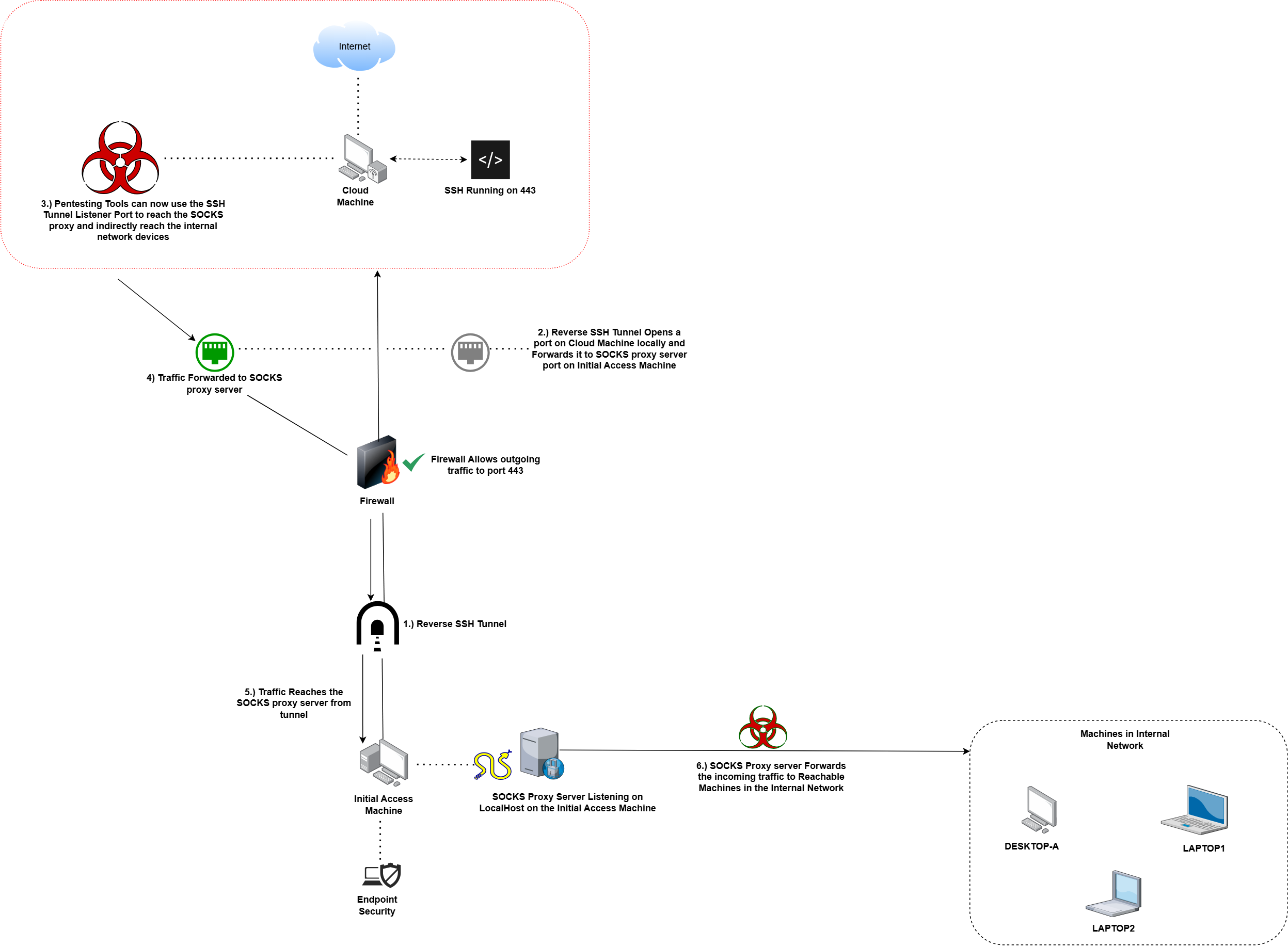
1.) We are going to utilize SSH client (from windows) to create a reverse SSH tunnel.
2.) We configure our remote server to run SSH on port 443, this increases the chances of outgoing SSH connections being successful and allowed by firewall.
3.) We also assume that we have access to clear text user credentials for our foothold or any other AD user.
Diagram Illustration of the Traffic Flow in this setup:
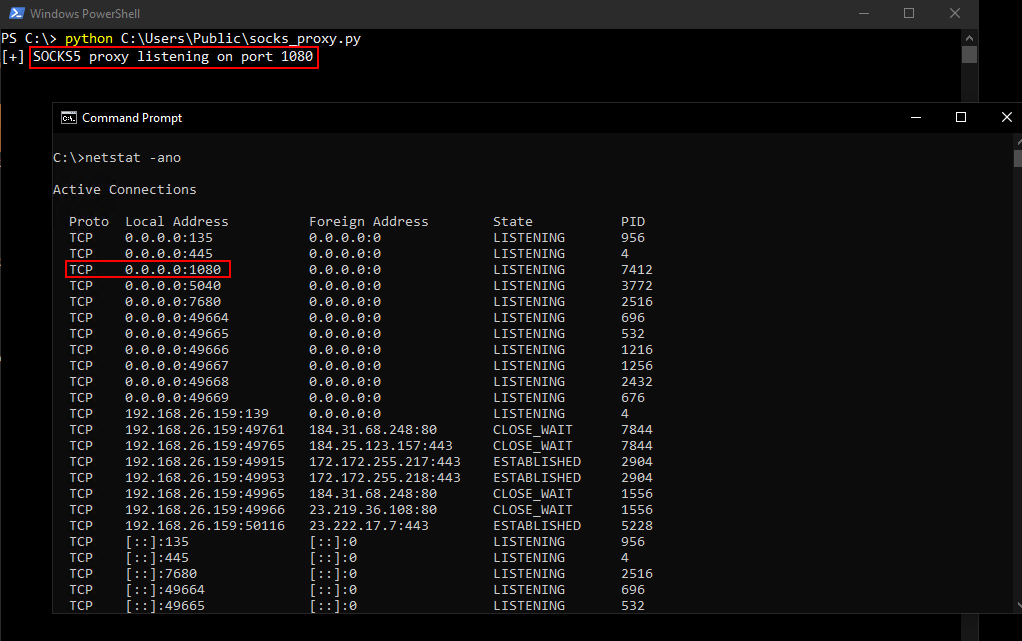
Hosting the SOCKS Proxy Server:
Simple Python Code to host a SOCKS proxy server is given below:
1.) Python can be installed on a windows system without needing admin privileges (You can also compile the python file to EXE on another machine and then use the standlone EXE).
2.) The SOCKS5 proxy server we have here is very minimal and as of nows works well with simple tools like proxychains.
3.) The implementation can be extended or reimplemented entirely (raw code: here):
SOCKS5 server proxy code (change port by editing LISTEN_PORT):
The code can be saved to a file and then executed to start a SOCKS5 proxy server listener.
Creating the Reverse SSH Tunnel:
1.) Our SSH server has been configured to run on port 443. (can be configured by editing the SSH configuration files)
2.) The public key of user where we are hosting the SOCKS server is added to authorized keys on the cloud machine SSH server.
3.) The password authentication can be disabled on the SSH server (not discussed here) and only key based authentication be utilized for access, for added security.
4.) Various Techniques can be used to transfer the public key (not discussed here) and added to the authorized keys list
5.) Once the key is added and 443 is allowed for incoming connections on our cloud machine, we can go ahead and create the reverse SSH tunnel
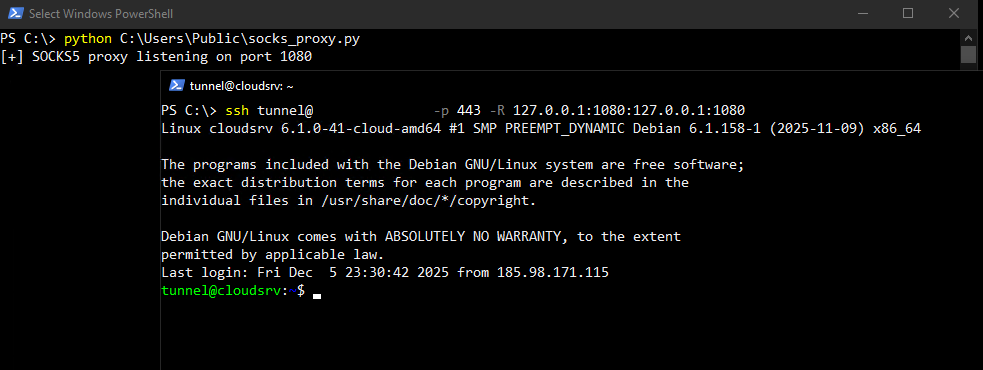
1.) Once the tunnel is created we will see the reverse tunnel port listening on our target cloud machine.
2.) This listening port (127.0.0.1:1080 in our case) can be added to the proxychains configuration file /etc/proxychains/proxychains.conf (file names could be different for your system depending on version of proxychains)
3.) Once the tunnel is in place and SOCKS server is running, from the cloud machine traffic can be sent to an internal machine routing through the reverse SSH tunnel and SOCKS proxy.
4.) The image below shows a test case of sending a HTTP GET request to an internal HTTP server from the cloud machine via the reverse SSH tunnel and SOCKS proxy

© 2025 Vrikodar